
The vinyl landscape in 2026 has evolved from a “retro” trend into a high-fidelity movement. As Sonos expands its ecosystem with revolutionary hardware like the Arc Ultra and the new Sonos Play (the 2026 entry-level standard), bridging analog warmth with digital convenience is more accessible than ever.
In this How to Connect Turntable to Sonos: The 2026 Ultimate Guide, we provide a technical roadmap through the latest hardware requirements and step-by-step configurations. While the “Sonos Vinyl” setup remains a highly searched and often misunderstood topic, our guide simplifies the process. Whether you are troubleshooting low volume or setting up multi-room audio, we’ll help you navigate the app settings and expert optimizations needed to dominate your home audio experience.
Table of Contents
- 1 The Essential Foundation – Understanding the Phono Preamp
- 2 Hardware Connectivity – Choosing Your Path
- 3 Step-by-Step Configuration in the Sonos App (v82.0+)
- 4 Sound Motion™ and Vinyl
- 5 2026 Recommended Gear List (Amazon Favorites)
- 6 FAQ – Troubleshooting Your Sonos Vinyl Setup
- 7 Quick Summary: How to Connect Turntable to Sonos at a Glance
The Essential Foundation – Understanding the Phono Preamp
Before we discuss speakers or specific cabling, the most critical step in how to connect turntable to Sonos is identifying your amplification needs. Specifically, we must address the ‘invisible’ hurdle of vinyl: the Phono Preamp.

A turntable produces a very weak electrical signal (Phono level). If you were to plug a turntable directly into a Sonos speaker without a preamp, the sound would be a faint, tinny whisper. A phono preamp boosts this signal to a “Line Level” that Sonos can process.
Does Your Turntable Have One?
In 2026, most modern turntables come with a built-in preamp, but you must verify this to avoid buying unnecessary gear or—worse—double-amplifying the signal, which causes heavy distortion.
- Check the Back: Look for a toggle switch labeled “Phono/Line.”
- The “Line” Setting: If you have this switch, set it to LINE. This activates the internal preamp.
- The “Phono” Setting: This bypasses the internal preamp, which is only used if you are connecting to a high-end external preamp or a vintage receiver.
- No Switch? If your turntable has only a ground wire and RCA jacks with no switch, it is likely a traditional model. You will need an external phono preamp.
Expert Strategy: For myhomespeakers.com readers, we recommend the Pro-Ject Phono Box MM. It is compact, shielded against Wi-Fi interference, and provides a neutral gain stage that perfectly matches the input sensitivity of the Sonos Era and Five series.
Hardware Connectivity – Choosing Your Path
As of 2026, Sonos offers four distinct ways to integrate your turntable. Your choice depends entirely on which Sonos hardware you currently own or plan to purchase.
1. The USB-C Era (Era 100, Era 300, Move 2, and Sonos Play)
Since the shift in 2023 and 2024, Sonos has moved away from 3.5mm jacks on its compact speakers in favor of multi-purpose USB-C ports.
- The Required Accessory: You cannot use a standard “phone” USB-C to 3.5mm adapter. Those are DACs (Digital-to-Analog Converters) meant for headphones. You need the Sonos Line-In Adapter or the Sonos Combo Adapter (which adds an Ethernet port). These contain an ADC (Analog-to-Digital Converter) chip that allows the speaker to “ingest” the analog signal.
- The Setup: 1. Connect an RCA-to-3.5mm “Y” Cable to your turntable/preamp.2. Plug the 3.5mm end into the Sonos Line-In Adapter.3. Plug the adapter into the USB-C port of your Era 100 or Sonos Play.
2. The Direct Analog Path (Sonos Five & Play:5 Gen 2)
The Sonos Five remains the undisputed king for vinyl enthusiasts. It is the only standalone Sonos speaker with a dedicated 3.5mm line-in port, requiring no proprietary adapters.
- Why it’s better: The Five features a high-grade analog-to-digital converter that preserves the dynamic range of high-end cartridges better than the smaller USB-C units.
- The Setup: Plug an RCA-to-3.5mm cable directly from the turntable into the back of the Five.
3. The Professional Integration (Sonos Amp & Port)
If you have a pair of high-end “passive” speakers (like Bowers & Wilkins or KEF) or an existing Hi-Fi stack, the Amp or Port are your best options.
- Sonos Amp: Powers your traditional speakers and includes RCA inputs for your turntable.
- Sonos Port: Adds Sonos streaming to your existing amplifier. It has “Analog In” for the turntable and “Analog Out” to feed your old-school receiver.
- The Setup: Use standard RCA-to-RCA cables. This is the cleanest signal path in the entire Sonos ecosystem.
4. The 2026 Wireless Standard: Bluetooth 5.3 & LE Audio
With the release of the Arc Ultra and Sonos Ace headphones, Bluetooth has finally become a viable “high-fidelity” bridge for vinyl.
- The Hardware: You need a Bluetooth-enabled turntable (e.g., Audio-Technica AT-LP70XBT).
- The Workflow: Pair the turntable to an Era 300 or Arc Ultra.
- The Benefit: Once the audio is in the Sonos system via Bluetooth, you can use Wi-Fi to “group” it with any other speaker in the house. This allows you to place your turntable on a bookshelf across the room from your speakers without running unsightly wires.
Step-by-Step Configuration in the Sonos App (v82.0+)
Connecting the wires is only half the battle. To ensure the best performance, you must optimize the settings within the Sonos App.
Step 1: Naming the Source
Once connected, the app will show a “Line-In” source. Don’t leave it named “Line-In.”
- Navigate to Settings > System.
- Select the speaker with the connection.
- Under Line-In, tap Source Name and select “Turntable.” This makes voice commands like “Hey Sonos, play the Turntable” actually work.
Step 2: The “Autoplay” Secret
One of the most annoying parts of a vinyl setup is having to open an app just to start the music.
- In the Line-In settings, toggle Autoplay to On.
- Select the room where the music should start.
- Pro Tip: Enable “Include Grouped Rooms” if you want your whole house to automatically kick into “Vinyl Mode” the second the needle touches the record.
Step 3: Adjusting the Line-In Source Level
Vinyl is an analog format, meaning its output level is often significantly lower than a digital stream from Apple Music.
- In the app, find Source Level.
- By default, it is set to 2. For most turntables, we recommend setting this to 8, 9, or 10.
- Warning: If you hear “clipping” (harsh distortion during loud parts), drop the level back down to 6 or 7.
Sound Motion™ and Vinyl
In 2026, the biggest buzzword in audio is Sound Motion™. Introduced with the Arc Ultra, this technology allows for massive bass response from extremely slim drivers.
When playing vinyl through a system featuring an Arc Ultra or the new Sub 4, you will notice a “tighter” low end. Analog recordings often have “rumble” (low-frequency mechanical noise). Traditional speakers can struggle with this, but the force-canceling nature of Sound Motion™ drivers effectively ignores the mechanical rumble while emphasizing the musical bass of the record.
2026 Recommended Gear List (Amazon Favorites)
To save our readers time, we have curated the top-rated hardware for this specific setup.
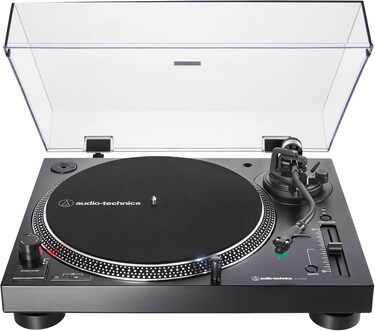
Audio-Technica AT-LP120XUSB
This is the “workhorse” of the industry. It includes a high-quality internal preamp, a USB output for digitizing your collection, and a direct-drive motor that is incredibly reliable. It looks professional and sounds better than anything in its price bracket.
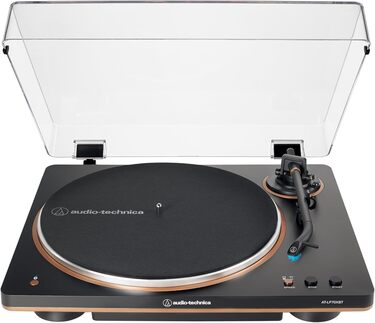
Audio-Technica AT-LP70XBT
For those who want the 2026 wireless experience, this turntable features Bluetooth 5.3. It pairs perfectly with the Sonos Era series and handles the “needle drop” automatically—perfect for beginners who are afraid of scratching their records.
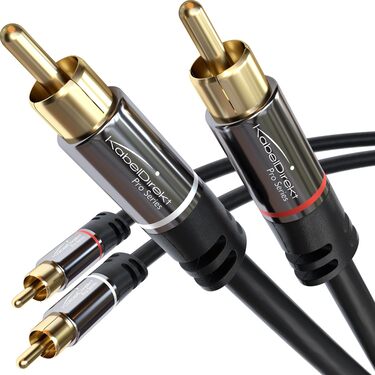
KabelDirekt RCA to 3.5mm (Shielded)
Standard cheap cables act as antennas for your Wi-Fi router, creating a “buzz” in your speakers. KabelDirekt uses double-shielding which is essential for a clean Sonos integration.

Official Sonos Line-In Adapter
Do not buy the $5 versions on Amazon. They will not work. Ensure you are getting the official Sonos-branded USB-C to 3.5mm adapter to ensure the ADC chip is compatible with your Era or Play speakers.
FAQ – Troubleshooting Your Sonos Vinyl Setup
Why do I hear a delay when I play a record?
Sonos converts the analog signal to digital so it can be sent over Wi-Fi to other rooms. This requires a small “buffer.” In the app, you can adjust this delay from 75ms to 2000ms. If your Wi-Fi is weak, set it higher to prevent dropouts. If you only listen in one room, keep it at 75ms.
Can I use my Sonos Ace headphones to listen to my turntable?
Yes! If your turntable is connected to a Sonos speaker (like an Era 300), you can use the TV Audio Swap logic or simply “Group” the Ace headphones with the speaker in the Sonos app. This is the ultimate way to enjoy private vinyl listening in 2026.
Does my turntable need to be near the speaker?
Only for the initial physical connection. If you connect your turntable to a Sonos Port in the basement, you can stream that audio to a Sonos Arc Ultra in the living room wirelessly via the app.
My sound is distorted even at low volumes. What’s wrong?
You are likely “double-preamping.” This happens if your turntable’s internal preamp is ON and you are also plugged into an external phono preamp. Turn one of them off.
Can I connect a turntable to a Sonos Roam or Roam 2?
Only via Bluetooth. The Roam series does not have a USB-C Line-In capability. It is strictly a “Bluetooth-to-Wi-Fi” bridge for your vinyl.
Quick Summary: How to Connect Turntable to Sonos at a Glance
We hope this How to Connect Turntable to Sonos Guide has helped you bridge the gap between analog and digital. Integrating a turntable into a Sonos system in 2026 is the perfect marriage of two worlds. You get the tactile, intentional experience of physical media paired with the “music everywhere” convenience of the world’s best multi-room platform.
By choosing the right hardware path—whether it’s the USB-C Line-In for your Era 100, a Direct Analog connection for your Sonos Five, or a Bluetooth 5.3 bridge for your Arc Ultra—you ensure that your vinyl collection isn’t tethered to a single corner of one room.
The secret to success lies in the details: using a shielded cable to prevent interference, setting your Source Levels correctly to match your streaming volume, and utilizing Autoplay to make the technology disappear. With this setup, your home will not just have “speakers”—it will have a living, breathing concert hall experience that respects the past while embracing the future.
Next Step for you: Check the back of your turntable for that “Phono/Line” switch today. Once you know your preamp status, you can confidently select the Sonos Line-In Adapter or the RCA cables needed to bring your music to life.
Happy spinning!
For more expert audio guides and the latest on the 2026 Sonos lineup, keep it locked to myhomespeakers.com.